
A Ford technology package can add a mix of in-cabin technology and driver-assistance features, but the exact bundle depends on the vehicle. If you are comparing vehicles, the label alone will not tell you what each one offers. Your trim and model year matter.
The equipment can shape your driving experience on a familiar road or a long trip. This article explains the package categories, shows real Ford examples, and helps you match features to your needs.
Think of the package name as a broad label, not a fixed promise. The particular features you find on a Ford depend on the vehicle’s equipment details.
Key Takeaways
- Package contents can vary by model, trim, and model year.
- Common categories include screens, audio, connectivity, and driver assistance.
- Connected services may have terms separate from factory equipment.
- Match the listed features to your daily driving needs.
- Ask to see the exact vehicle’s equipment details and try its features.
What Ford Technology Packages Typically Cover
A useful way to read a technology-package description is to sort its equipment into four categories. That makes comparisons clearer, since one bundle may focus on screens while another adds driver-assistance equipment.
Look for infotainment and display, audio, connectivity, and driver assistance. A feature may come standard on one trim, cost extra on another, or be unavailable on a different vehicle.
Package names can sound alike, but the equipment inside them may differ by vehicle, trim, and model year.
Infotainment and display cover the screen and controls used to reach vehicle functions and apps. Audio refers to the speakers and sound system, while connectivity links the vehicle or passengers to online services.
Related Posts:
- Is MIPS Technology Worth It? Safety Benefits, Pros &…

- What Is the Average Salary in Automotive Technology?

- Tech Hacks for PBLinuxGaming Optimize Your Gaming Setup

- What Are the Technologies Used in Web Design? A…

- What Is Fuel Cell Technology in Cars and How Does It Work?

- What is a Tech Hacker Skills and Tools Explained

Driver assistance includes features designed to support tasks such as monitoring nearby traffic or adjusting cruise speed. Ford Co-Pilot360 is Ford’s umbrella name for a group of driver-assistance features.
A factory-installed equipment group is different from a connected service. Services and connected features can have separate availability, activation steps, or terms, as Ford explains on its Connectivity Package page.
Descriptions may also combine equipment with services, so read each item rather than relying on the group name. These categories can help you spot the specific features a Ford package may offer.
What Does the Ford Technology Package Include?
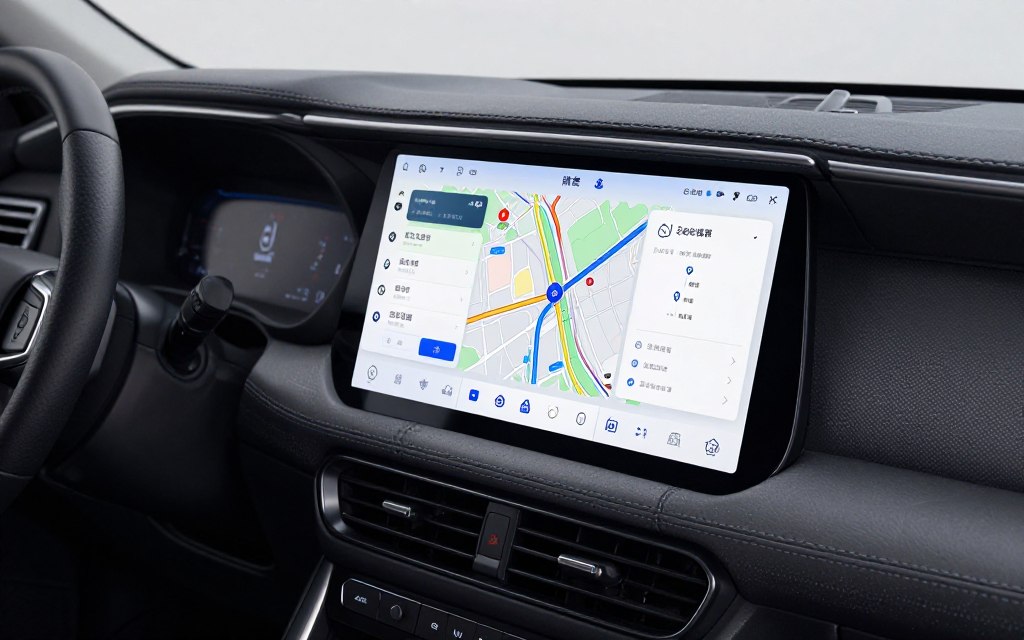
A technology package may upgrade the center display and the way drivers reach apps, audio, and navigation. On some vehicles, the screen also brings phone functions and digital services into one place.
The exact features depend on the Ford model, trim, and model year. The 2025 Ford Explorer offers one example, with a 13.2-inch LCD touchscreen and Ford Digital Experience, powered by Google.
Touchscreen and Infotainment
A touchscreen can display vehicle settings, apps, and navigation tools. In the 2025 Explorer, Ford Digital Experience includes access to Google Play, Google Maps, and Google Assistant.
That system uses 5G connectivity. Screen size and software can differ across vehicles, so an Explorer example does not describe every Ford package.
Premium Audio and Phone Connectivity
Available audio equipment can change what you hear in the cabin. The Explorer’s available B&O Sound System by Bang & Olufsen has ten speakers and a subwoofer.
Apple CarPlay and Android Auto let drivers reach compatible phone apps through the vehicle. That can make it easier to use familiar apps without handling your phone for each task.
Wireless Apple CarPlay and Android Auto are available on some Ford examples, but do not assume every trim has them. Check whether the equipment is wireless or uses a cable.
Navigation and Connected Services
Ford Connected Built-In Navigation can provide maps and route guidance through the vehicle. Connected services may have separate availability or terms from a factory equipment group.
The Explorer’s in-vehicle Wi-Fi can connect up to ten devices. Passengers can connect their phones or tablets, though service access and terms can vary.
| Category | Example | What it does | Availability note |
|---|---|---|---|
| Infotainment | 13.2-inch LCD touchscreen | Presents vehicle and app functions | 2025 Explorer example |
| Audio | Ten-speaker B&O system with subwoofer | Provides cabin audio | Available equipment |
| Connectivity | Wi-Fi for up to ten devices | Connects passengers’ devices | Explorer example |
| Built-in digital services | Google Play, Google Maps, Google Assistant | Provides apps, maps, and voice assistance | 2025 Explorer Ford Digital Experience |
These cabin upgrades are only part of the package question. Driver-assistance equipment can add another set of features to compare.
Which Driver-Assist Features Can Be Included?
Driver-assistance equipment can range from alerts and automatic braking to cruise control that adjusts speed and lane centering. These systems support the driver, but they do not replace attention or control.
Feature names and availability vary by vehicle and equipment group. Ford Co-Pilot360 is Ford’s umbrella name for a group of driver-assistance features, not one identical set on every model.
Core Ford Co-Pilot360 Features
Explorer examples include Pre-Collision Assist with Automatic Emergency Braking, a Lane-Keeping System, and a rearview camera. They also include BLIS with Cross-Traffic Alert and Auto High-Beam Headlamps.
Automatic emergency braking is intended to help respond to a possible collision. Blind-spot alerts can warn you about vehicles in areas beside your vehicle, while lane-keeping features can support lane awareness.
Co-Pilot360 Assist+ Upgrades
Explorer Co-Pilot360 Assist+ examples include Intelligent Adaptive Cruise Control with Stop-and-Go and Lane Centering. Adaptive cruise control can adjust speed to help maintain a set gap from traffic.
Lane centering can help guide the vehicle within marked lanes. Assist+ examples also include Speed Sign Recognition, Evasive Steering Assist, and voice-activated touchscreen navigation with SiriusXM Traffic and Travel Link.
Ford lists descriptions and availability for its Co-Pilot360 driver-assistance features. These systems still require you to watch the road and remain ready to steer or brake.
BlueCruise and Driver Responsibility
Ford BlueCruise allows hands-free driving on compatible highways. It differs from conventional driver assistance because hands-free use is limited to those compatible highways.
You remain responsible for driving, even when a system is active. Check the equipment description for the exact features and any stated limits.
- Is adaptive cruise included?
- Does it have lane centering?
- Which collision-warning or braking functions are listed?
- Is BlueCruise included or separately available?
Checking the exact feature names matters more than relying on a broad label. Those names and bundles can change by model and year.
How Do Ford Technology Packages Differ by Model and Year?
Two Ford vehicles can use similar package language while offering different screens and equipment. Compare each example on its own, since a feature listed for one Ford Explorer trim may not apply elsewhere.
Package contents are specific to the model, trim, and model year. The examples below show why “Ford Explorer Technology Package” and “Ford Explorer ST Technology Package” should not be treated as identical labels.
Explorer and Explorer ST Package Examples
An Explorer technology-package example includes a 10.1-inch LCD touchscreen, wireless Apple CarPlay and Android Auto, a B&O sound system, and a wireless charging pad.
The Explorer ST technology-package example includes a 12.3-inch digital instrument cluster with customizable displays and modes. The display equipment differs from the 10.1-inch touchscreen example.
Explorer Connected Built-In Navigation examples include real-time traffic and route updates, voice-activated controls, weather information, and points of interest. These details still depend on the specific vehicle and model year.
| Example | Display | Other named equipment | Qualification |
|---|---|---|---|
| Explorer technology-package example | 10.1-inch LCD touchscreen | Wireless Apple CarPlay and Android Auto, B&O sound, wireless charging pad | Availability depends on trim and model year |
| 2025 Explorer | 13.2-inch LCD touchscreen | Ford Digital Experience | 2025 model example |
| Explorer ST technology-package example | 12.3-inch digital instrument cluster | Customizable displays and modes | ST-specific example |
F-150 and Model-Year Differences
A Ford technology package for F-150 must be matched to the truck’s own equipment information. Explorer screens or services do not establish what an F-150 includes.
Even the same model name can have different equipment across model years. Matching features to your needs starts with treating every example as specific, not universal.
Which Features Make the Biggest Difference in Daily Driving?
The most valuable upgrade depends on which task you want the vehicle to make easier. Your routine matters more than a long list of advanced features.
Choose features that fit the trips you actually take. Phone integration and navigation can reduce the need to handle a phone, while connectivity can keep passengers’ devices online.
On a daily commute, a clear screen or phone integration may matter more than a feature you rarely use. On a highway trip, adaptive cruise or lane centering may ease some driving tasks, but you must still pay attention.
Family travel can make cabin audio and Wi-Fi useful for passengers. On unfamiliar routes, connected navigation can help you follow directions and see route updates.
- Frequent highway driving: check for adaptive cruise or lane-centering availability.
- Long trips with passengers: compare connectivity and audio features.
- Frequent unfamiliar routes: look for connected navigation.
- Fewer loose charging cables: check for wireless charging.
A feature’s value depends on how often it helps with a real task. Use your driving habits to decide which items deserve attention in a package list.
How Can You Confirm the Right Package Before Buying?
Before deciding that a package is included, match its equipment description to the exact vehicle you are considering. The vehicle’s own details matter, especially when listings use similar package names.
Package price depends on the specific model, trim, model year, and selected equipment. A description for one vehicle does not confirm what another one has.
Confirm each named feature on the exact vehicle, not just in a general package description.
- Verify the model year and trim.
- Compare the vehicle’s equipment list or window sticker with the package description.
- Check which services or connectivity features have separate availability or terms.
- Confirm that the named features are on the specific vehicle.
If you are asking what the Ford technology package includes for the F-150, use that truck’s exact model-year and trim equipment list. The same rule applies to questions about 2021 or 2022 vehicles.
Do not assume those older vehicles share features shown for a current Explorer. Compare confirmed equipment with your needs before you take the next step.
Conclusion
The right technology package is the one that delivers the features you will use in the vehicle you are buying. A longer feature list is not automatically better if its equipment does not fit your routine.
Ask to see the equipment details for the exact vehicle, then schedule a test drive to try the features it has. That gives you a chance to judge the screen, controls, and driver-assistance systems in person.
Compare what you can confirm with the tasks you want the vehicle to make easier. Confirm the equipment and schedule a test drive before you decide.
